MySQL Workbench
This page contains some hints on the use of MySQL Workbench. u ### Setting preferences for column types and flags
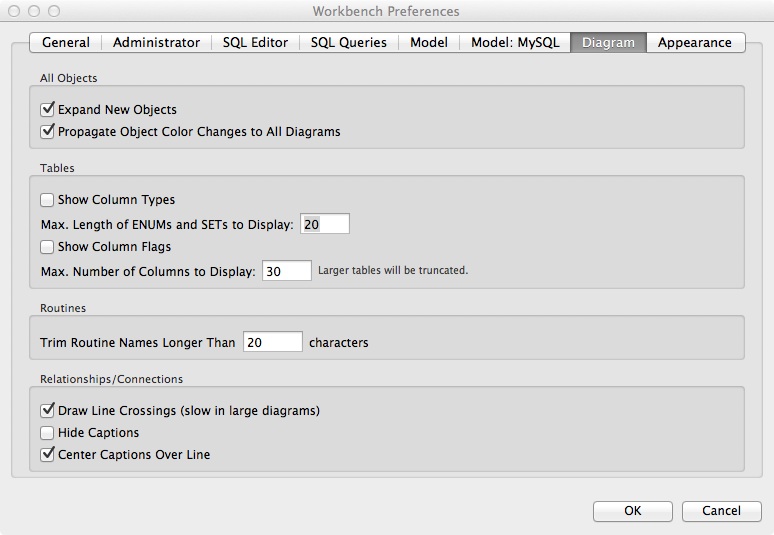
I find it easier to hide details of a data model's column types and column flags. The focus in data modeling should be on entities and relationships, and these are easier to see if the diagram is kept compact and can fit on a single screen. Thus, in the Tables portion of the following diagram, I turn off Show Column Types and Show Column Flags.
MySQLWorkbench > Preferences > Diagram
Setting preferences for generated primary keys, foreign keys, and associative relationships
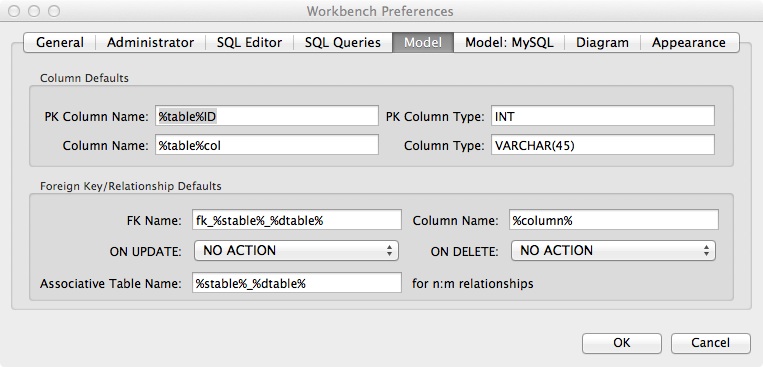
There are two common practices that you might want to adopt when MySQL Workbench generates foreign keys and associative relationships.
- Create a primary key of the form tablenameID (e.g., personID).
- Set PK Column Name to %table%ID
- When it does not cause ambiguity, give a foreign key the same column name as the matching primary key.
- Set Column Name to %column%
- Use a separating underscore to combine the names of the tables in an m:m relationship to create the name of the new entity (e.g., tableA_tableB).
- Set Associative Table Name to %stable%_%dtable%
MySQLWorkbench > Preferences > Model