Reference 2: SQL Playbook
Play so that you may be serious.
Anacharsis (c. 600 b.c.e.)
The power of SQL
SQL is a very powerful retrieval language, and most novices underestimate its capability. Furthermore, mastery of SQL takes considerable practice and exposure to a wide variety of problems. This reference serves the dual purpose of revealing the full power of SQL and providing an extensive set of diverse queries. To make this reference easier to use, we have named each of the queries to make them easy to remember.
Lacroix and Pirotte1 have defined 66 queries for testing a query language’s power, and their work is the foundation of this chapter. Not all their queries are included, some have been kept for the end-of-chapter exercises. Also, many of the queries have been reworded to various extents. Because these queries are more difficult than those normally used in business decision making, they provide a good test of your SQL skills. If you can answer all of them, then you are a proficient SQL programmer.
You are encouraged to formulate and test your answer to a query before reading the suggested solution.2 A q has been prefixed to all entity and table names to distinguish them from entities and tables used in earlier problems. The going gets tough after the first few queries, and you can expect to spend some time formulating and testing each one, but remember, this is still considerably faster than using a procedural programming language, such as Java, to write the same queries.
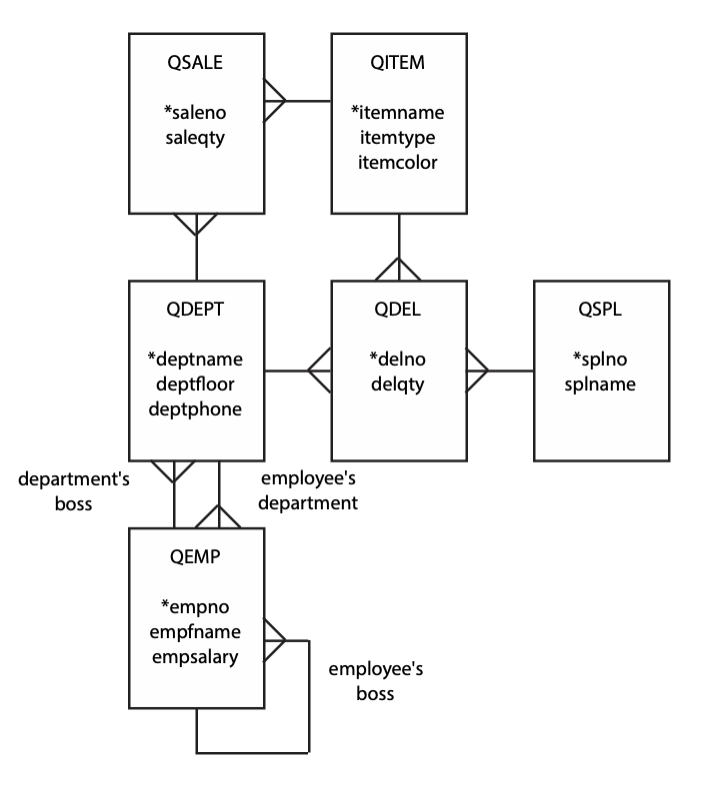
The data model accompanying Lacroix and Pirotte’s queries is shown in the following figure. You will notice that the complexity of the real world has been reduced: a sale and a delivery are assumed to have only one item.
Generating queries with Claude
Claude generates SQL that produces identical output, maybe with different ordering, for most of the queries. There is a note for those that don’t, and I am testing whether refining the language of the query gives valid SQL. See how to use Claude to generate SQL to respond to a natural language query.
1. A slow full toss
In cricket, a slow full toss is the easiest ball to hit. The same applies to this simple query.
- Find the names of employees in the Marketing department.
SELECT empfname FROM qemp WHERE deptname = 'Marketing';2. Skinning a cat
Queries often can be solved in several ways. For this query, four possible solutions are presented.
- Find the items sold by a department on the second floor.
A join of qsale and qdept is possibly the most obvious way to answer this query.
SELECT DISTINCT itemname FROM qsale, qdept
WHERE qdept.deptname = qsale.deptname
AND deptfloor = 2;
Another simple approach is to use an IN clause. First find all the departments on the second floor, and then find a match in qsale. The subquery returns a list of all departments on the second floor. Then use the IN clause to find a match on department name in qsale. Notice that this is the most efficient form of the query.
SELECT DISTINCT itemname FROM qsale
WHERE deptname IN
(SELECT deptname FROM qdept WHERE deptfloor = 2);
Conceptually, you can think of this correlated query as stepping through qsale one row at a time. The subquery is executed for each row of qsale, and if there is a match for the current value of qsale.deptname, the current value of itemname is listed.
SELECT DISTINCT itemname FROM qsale
WHERE deptname IN
(SELECT deptname FROM qdept
WHERE qdept.deptname = qsale.deptname
AND deptfloor = 2);
Think of this query as stepping through each row of qsale and evaluating whether the existence test is true. Remember, EXISTS returns true if there is at least one row in the inner query for which the condition is true.
The difference between a correlated subquery and existence testing is that a correlated subquery returns either the value of a column or an empty table, while EXISTS returns either true or false. It may help to think of this version of the query as, “” SELECT item names from sale such that there exists a department relating them to the second floor.”
SELECT DISTINCT itemname FROM qsale
WHERE EXISTS
(SELECT * FROM qdept
WHERE qsale.deptname = qdept.deptname
AND deptfloor = 2);
3. Another full toss
- Find the names of items sold on floors other than the second floor.
This query is a slight adaptation of the second. Just change the equals to a not equals.
SELECT DISTINCT itemname FROM qsale
   WHERE deptname IN
    (SELECT deptname FROM qdept
       WHERE deptfloor != 2);
4. Subtracting from all
- For items that have been sold, find the items sold by no department on the second floor
You may first think this query is the same as the preceding. However, the prior query does not exclude an item that is sold on some other floor in addition to the second floor. For example, if polo sticks are sold on both the third and second floors, they will be reported by the preceding query because they are sold on a floor other than the second floor.
The correct way to approach this is to first get a list of all items sold on the second floor (the second query) and then subtract this result from all items sold. Clearly, the difference must be all items not sold on the second floor.
SELECT DISTINCT itemname FROM qsale
WHERE itemname NOT IN
(SELECT DISTINCT itemname FROM qsale, qdept
WHERE qsale.deptname = qdept.deptname
AND deptfloor = 2);
5. Dividing
- Find the items sold by all departments on the second floor.
This is the relational algebra divide or the SQL double NOT EXISTS encountered in Chapter 5. You can think of this query as
SELECT items from sales such that there does not exist a department on the second floor that does not sell this item.
However, it is easier to apply the SQL template described in Chapter 5, which is
SELECT target1 FROM target
WHERE NOT EXISTS
(SELECT * FROM source
WHERE NOT EXISTS
(SELECT * FROM target-source
WHERE target-source.target# = target.target#
AND target-source.source# = source.source#));
The substitutions are straightforward.
| target1 | = | itemname |
|---|---|---|
| target | = | qitem |
| source | = | qdept |
| target-source | = | qsale |
| target# | = | itemname |
| source# | = | deptname |
Some additional code needs to be added to handle the restriction to items on the second floor. The query becomes
SELECT DISTINCT itemname FROM qitem
WHERE NOT EXISTS
(SELECT * FROM qdept WHERE deptfloor = 2
AND NOT EXISTS
(SELECT * FROM qsale
WHERE qsale.itemname = qitem.itemname
AND qsale.deptname = qdept.deptname));
Here is an alternative approach to formulating the problem:
Find all the items for which the number of second-floor departments that sell them is equal to the total number of departments on the second floor.
SELECT qsale.itemname FROM qsale, qdept
WHERE qsale.deptname = qdept.deptname
AND qdept.deptfloor = 2
GROUP BY qsale.itemname
HAVING COUNT(DISTINCT qdept.deptname) =
(SELECT COUNT(DISTINCT deptname)
FROM qdept WHERE deptfloor = 2);
6. At least some number
- Find the items sold by at least two departments on the second floor.
The GROUP BY and HAVING clauses make it easy for you to count the number of rows that meet some condition.
SELECT itemname FROM qsale, qdept
WHERE qsale.deptname = qdept.deptname and deptfloor = 2
GROUP BY itemname
HAVING COUNT(DISTINCT qdept.deptname) > 1;
7. A friendly IN for an SQL traveler
- Find the name and salary of Clare’s manager.
This query is readily handled with the IN clause. The inner query gets the employee number of Clare’s manager, and this locates the row containing that person’s salary.
SELECT empfname, empsalary FROM qemp
WHERE empno IN
(SELECT bossno FROM qemp WHERE empfname = 'Clare');
8. Joining a table with itself
- Find numbers and names of those employees who make more than their manager.
This query is a simple play once you realize that you can conceptually create two copies of a table and join them. This type of query is discussed in more depth in Chapter 6.
SELECT wrk.empno, wrk.empfname FROM qemp wrk, qemp boss
WHERE wrk.bossno = boss.empno
AND boss.empsalary < wrk.empsalary;
9. A combination of subtract from all and a self-join
- Find the departments where all the employees earn less than their manager.
The key is to first find the departments with more than one employee and then subtract from these departments from those where there is an employee who earns more than the boss. This query is a combination, conceptually, of queries 4 and 8.
SELECT DISTINCT deptname
FROM qemp
WHERE deptname IN
    (SELECT qdept.deptname
     FROM qdept
     JOIN qemp ON qdept.deptname = qemp.deptname
     GROUP BY qdept.deptname
     HAVING COUNT(*) > 1)
  AND deptname NOT IN
    (SELECT wrk.deptname
     FROM qemp wrk,
          qemp boss
     WHERE wrk.bossno = boss.empno
       AND wrk.empsalary >= boss.empsalary);
10. Self-join with GROUP BY
- Report the number of direct employees of each manager. Report the boss’s name
Join the table with itself by matching employees and their managers and then group by manager’s name with a count. Just in case two bosses have the same first name, employee number is included in the selection and grouping clauses.
SELECT boss.empno, boss.empfname, COUNT(*) AS num_direct_reports
FROM qemp wrk, qemp boss
WHERE wrk.bossno = boss.empno
    GROUP BY boss.empno, boss.empfname;
11. A self-join with two matching conditions
- Find the names of employees who are in the same department as their manager (as an employee). Report the name of the employee, the department, and the boss’s name.
There is no reason why a join cannot have matching on more than one common column. Here we have two conditions: one for employee number and one for department name.
SELECT wrk.empfname, wrk.deptname, boss.empfname AS manager_name
FROM qemp wrk, qemp boss
WHERE wrk.bossno = boss.empno
AND wrk.deptname = boss.deptname;
12. Averaging with GROUP BY
- List the departments having an average salary over $25,000.
A gimme for any half-decent SQL programmer.
SELECT deptname, AVG(empsalary) FROM qemp
GROUP BY deptname
HAVING AVG(empsalary) > 25000;
13. Inner query GROUP BY and HAVING
- List the departments where the average salary of the employees of each manager is more than $25,000. Report the average salary. Exclude the manager’s salary from the average calculation.
Claude does not generate correct SQL for the prompt.
SELECT deptname, bossno, empsalary AS avg_salary
FROM qemp
WHERE empno NOT IN (SELECT DISTINCT bossno FROM qemp WHERE bossno IS NOT NULL)
GROUP BY deptname, bossno
HAVING AVG(empsalary) > 25000;
14. An IN with GROUP BY and COUNT
- List the name and salary of the managers with more than two employees.
The inner query uses grouping with counting to identify the employee numbers of managers with more than two employees. The outer query reports details of these managers.
SELECT empfname, empsalary FROM qemp
    WHERE empno IN
        (SELECT bossno FROM qemp
            GROUP BY bossno HAVING COUNT(*) > 2);
15. A self-join with some conditions
- List the name, salary, and manager of the employees of the Marketing department who have a salary over $25,000.
A join gets workers and bosses together in the same row, and then the various conditions are applied to restrict the rows reported.
SELECT wrk.empfname, wrk.empsalary, boss.empfname AS manager
FROM qemp wrk, qemp boss
WHERE wrk.bossno = boss.empno
AND wrk.deptname = 'Marketing'
AND wrk.empsalary > 25000;
16. Making comparisons
- List the names of the employees who earn more than any employee in the Marketing department.
The first step is to determine the maximum salary of anyone in the Marketing department. Then, find anyone with a larger salary.
SELECT empfname, empsalary FROM qemp
WHERE empsalary >
(SELECT MAX(empsalary) FROM qemp
WHERE deptname = 'Marketing');
17. An IN with GROUP BY and SUM
- Among all the departments with total salary greater than $25,000, find the departments that sell Sextants.
This is very similar to query 16. First, find the departments that satisfy the condition, and then SELECT from that list any departments that sell Stetsons.
SELECT DISTINCT deptname FROM qsale
WHERE itemname = 'Sextant'
AND deptname IN
(SELECT deptname FROM qemp
GROUP BY deptname HAVING SUM(empsalary) > 25000);- A double divide!
- List the items delivered by every supplier that delivers all items of type N.
Claude does not generate correct SQL for the prompt.
SQL programmers who tackle this query without blinking an eye are superheroes. This is a genuinely true-blue, tough query because it is two divides. There is an inner divide that determines the suppliers that deliver all items of type N. The SQL for this query is
SELECT * FROM qspl
WHERE NOT EXISTS
(SELECT * FROM qitem WHERE itemtype = 'N'
AND NOT EXISTS
(SELECT * FROM qdel
WHERE qdel.itemname = qitem.itemname
AND qdel.splno = qspl.splno));
Then there is an outer divide that determines which of the suppliers (returned by the inner divide) provide all these items. If we call the result of the inner query qspn, the SQL for the outer query is
SELECT DISTINCT itemname FROM qdel del
WHERE NOT EXISTS
(SELECT * FROM qspn
WHERE NOT EXISTS
(SELECT * FROM qdel
WHERE qdel.itemname = del.itemname
AND qdel.splno = qspn.splno));
The complete query is
SELECT DISTINCT itemname FROM qdel del
WHERE NOT EXISTS
(SELECT * FROM qspl
WHERE NOT EXISTS
(SELECT * FROM qitem WHERE itemtype = 'N'
AND NOT EXISTS
(SELECT * FROM qdel
WHERE qdel.itemname = qitem.itemname
AND qdel.splno = qspl.splno))
AND NOT EXISTS
(SELECT * FROM qdel
WHERE qdel.itemname = del.itemname
AND qdel.splno = qspl.splno));- A slam dunk
- Find the names suppliers that deliver compasses.
A simple query to recover from the double divide. It is a good idea to include supplier number since splname could possibly be nonunique.
SELECT DISTINCT qspl.splno, splname FROM qspl, qdel
WHERE qspl.splno = qdel.splno AND itemname = 'Compass';- A 6-inch putt for a birdie
- Find the suppliers that do not deliver compasses.
This is a relatively straightforward subtract (and take one off par for a birdie).
SELECT splno, splname FROM qspl
WHERE splno NOT IN
(SELECT splno FROM qdel WHERE itemname = 'Compass');- Making the count
- Find the names of suppliers that deliver both compasses and an item other than compasses.
A simple approach is to find those suppliers that supply items other than compasses (i.e., itemname <> ‘Compass’) and also supply compasses (the subquery).
SELECT DISTINCT qdel.splno, splname FROM qspl, qdel
WHERE qdel.splno = qspl.splno
AND itemname = 'Compass'
AND qdel.splno IN
(SELECT splno FROM qdel WHERE itemname = 'Compass');
A more general approach is to find suppliers that have delivered compasses and more than one item (i.e., COUNT(DISTINCT itemname) > 1). This means they deliver at least an item other than compasses. Note that the GROUP BY clause includes supplier number to cope with the situation where two suppliers have the same name. The DISTINCT itemname clause must be used to guard against multiple deliveries of compasses from the same supplier.
SELECT DISTINCT qdel.splno, splname FROM qspl, qdel
WHERE qdel.splno = qspl.splno
AND qdel.splno IN
(SELECT splno FROM qdel WHERE itemname = 'Compass')
GROUP BY qdel.splno, splname HAVING COUNT(DISTINCT itemname) > 1;
The more general approach enables you to solve queries, such as Find suppliers that deliver three items other than compasses, by changing the HAVING clause to COUNT(DISTINCT itemname > 3).
- Minus and divide
- List the departments that have not recorded a sale for all the items of type N.
This query has two parts: an inner divide and an outer minus. The inner query finds departments that have sold all items of type N. These are then subtracted from all departments to leave only those that have not sold all items of type N.
SELECT deptname FROM qdept WHERE deptname NOT IN
(SELECT deptname FROM qdept
WHERE NOT EXISTS
(SELECT * FROM qitem WHERE itemtype = 'N'
AND NOT EXISTS
(SELECT * FROM qsale
WHERE qsale.deptname = qdept.deptname AND
qsale.itemname = qitem.itemname)));- Division with copies
- For departments that sold items, list those departments that have at least one sale of all the items delivered to them
This is a variation on the divide concept. Normally with a divide, you have three tables representing a many-to-many (m:m) relationship. In this case, you only have two tables: qdel and qsale. You can still construct the query, however, by creating two copies of qdel (del1 and del2 in this case) and then proceeding as if you had three different tables. Also, you must match on deptname so that you get the correct (deptname, itemname) pair for comparing with qsale.
Claude does not generate correct SQL for the prompt.
SELECT DISTINCT deptname FROM qdel del1
WHERE NOT EXISTS
(SELECT * FROM qdel del2
WHERE del2.deptname = del1.deptname
AND NOT EXISTS
(SELECT * FROM qsale
WHERE del2.itemname = qsale.itemname
AND del1.deptname = qsale.deptname));
This query can also be written as shown next. Observe how NOT IN functions like NOT EXISTS. We will use this variation on divide with some of the upcoming queries.
SELECT DISTINCT deptname FROM qdel del1
WHERE NOT EXISTS
(SELECT * FROM qdel del2
WHERE del2.deptname = del1.deptname
AND itemname NOT IN
(SELECT itemname FROM qsale
WHERE deptname = del1.deptname));- A difficult pairing
- List the supplier-department pairs where the department sells all items delivered to it by the supplier.
This query is yet another variation on divide. An additional complication is that you have to match the department name and item name of sales and deliveries.
SELECT splname, deptname FROM qdel del1, qspl
WHERE del1.splno = qspl.splno
AND NOT EXISTS
(SELECT * FROM qdel
WHERE qdel.deptname = del1.deptname
AND qdel.splno = del1.splno
AND itemname NOT IN
(SELECT itemname FROM qsale
WHERE qsale.deptname = del1.deptname));- Two divides and an intersection
- For departments that have sold items, list those items delivered to all departments by all suppliers
This query has three parts. First, find the items delivered by all suppliers (the first divide), then find the items delivered to all departments (the second divide). Finally, find the items that satisfy both conditions—the function of the AND connection between the two divides. The items reported must be the ones both delivered by all suppliers and delivered to all departments. The administrative departments (Management, Marketing, Personnel, Accounting, and Purchasing) should be excluded because they do not sell items.
Claude does not generate correct SQL for the prompt.
SELECT itemname FROM qitem
  WHERE NOT EXISTS
    (SELECT * FROM qspl
      WHERE NOT EXISTS
        (SELECT * FROM qdel
           WHERE qdel.itemname = qitem.itemname
           AND qdel.splno = qspl.splno))
AND NOT EXISTS
  (SELECT * FROM qdept
    WHERE deptname IN (SELECT deptname FROM qsale)
  AND NOT EXISTS
    (SELECT * FROM qdel
      WHERE qdel.itemname = qitem.itemname
AND qdel.deptname = qdept.deptname));- A divide with a matching condition
- List the items sold only by departments that sell all the items delivered to them.
Yet another variation on divide—which is why you needed a break. There are two parts to this query. First, look for items sold by departments that sell all items delivered to them, and then make sure that no other department sells the same item.
SELECT DISTINCT itemname FROM qsale sale
    WHERE deptname IN
        (SELECT deptname FROM qdept dept1
            WHERE NOT EXISTS
                (SELECT * FROM qdel
                    WHERE qdel.deptname = dept1.deptname
                    AND itemname NOT IN
                        (SELECT itemname FROM qsale
                            WHERE qsale.deptname = dept1.deptname)))
    AND NOT EXISTS
        (SELECT * FROM qsale
            WHERE itemname = sale.itemname
            AND deptname NOT IN
                (SELECT deptname FROM qdept dept2
                    WHERE NOT EXISTS
                        (SELECT * FROM qdel
                             WHERE qdel.deptname = dept2.deptname
                             AND itemname NOT IN
                                (SELECT itemname FROM qsale
WHERE qsale.deptname = dept2.deptname))));- Restricted divide
- Who are the suppliers that deliver all the items of type N?
A slight variation on the standard divide to restrict consideration to the type N items.
SELECT splno, splname FROM qspl
    WHERE NOT EXISTS
        (SELECT * FROM qitem WHERE itemtype = 'N'
        AND NOT EXISTS
            (SELECT * FROM qdel
                WHERE qdel.splno = qspl.splno
AND qdel.itemname = qitem.itemname));- A NOT IN variation on divide
- List the names of suppliers that deliver only the items sold by the Books department.
This query may be rewritten as, select suppliers for which there does not exist a delivery that does not include the items sold by the Books department. Note the use of the IN clause to limit consideration to those suppliers that have made a delivery. Otherwise, a supplier that has never delivered an item will be reported as delivering only the items sold by the Books department.
SELECT splname FROM qspl
    WHERE splno IN (SELECT splno FROM qdel)
    AND NOT EXISTS
        (SELECT * FROM qdel
            WHERE qdel.splno = qspl.splno
            AND itemname NOT IN
                (SELECT itemname FROM qsale
WHERE deptname = 'Books'));- All and only
- List the names suppliers that deliver all and only the items sold by the Equipment department.
This is a query with three parts. The first part identifies suppliers that deliver all items sold by the Equipment department (they could also deliver other items, but these are not sold in the Equipment department). The second part identifies suppliers that deliver only items sold by the Equipment department (i.e., they do not deliver any other items). This part is similar to the previous query. The third part is the intersection of the first two queries to indicate suppliers that satisfy both conditions.
SELECT splname FROM qspl
    WHERE NOT EXISTS
        (SELECT * FROM qsale
            WHERE deptname = 'Equipment'
            AND itemname NOT IN
                (SELECT itemname FROM qdel
                    WHERE qdel.splno = qspl.splno))
                    AND NOT EXISTS
                        (SELECT * FROM qdel
                            WHERE qdel.splno = qspl.splno
                            AND itemname NOT IN
                                (SELECT itemname FROM qsale
WHERE deptname = 'Equipment'));- Divide with an extra condition
- List the names of suppliers that deliver every item of type C to the same department on the second floor.
This is a divide in which there are three WHERE conditions in the innermost query. The extra condition handles the “same department” requirement.
SELECT splname FROM qspl
    WHERE EXISTS (SELECT * FROM qdept
        WHERE deptfloor = 2
        AND NOT EXISTS (SELECT * FROM qitem
            WHERE itemtype = 'C'
            AND NOT EXISTS (SELECT * FROM qdel
                WHERE qdel.splno = qspl.splno
                AND qdel.itemname = qitem.itemname
AND qdel.deptname = qdept.deptname)));- At least some COUNT
- List the names of suppliers that deliver at least two items of type N to departments.
First, do a three-way join to get the data for deliveries, suppliers, and items. Then, group with a COUNT condition. This can be easily extended to a variety of conditions based on counts.
SELECT qspl.splno, splname FROM qdel, qspl, qitem
    WHERE itemtype = 'N'
    AND qdel.splno = qspl.splno
    AND qdel.itemname = qitem.itemname
        GROUP BY qspl.splno, splname
HAVING COUNT(DISTINCT qdel.itemname) > 1;- Double divide with a restriction
- List the names of suppliers that deliver all the items of type B to departments on the second floor who sell all the items of type R.
Break this query into two parts. First, create a temporary table of departments on the second floor that sell all items of type R. Second, report all the suppliers that deliver all the items of type B to the departments designated in the previously created through the temporary table.
WITH TEMP AS
  (SELECT deptname
   FROM qdept
   WHERE deptfloor = 2
     AND NOT EXISTS
       (SELECT *
        FROM qitem
        WHERE itemtype = 'R'
          AND NOT EXISTS
            (SELECT *
             FROM qsale
             WHERE qsale.itemname = qitem.itemname
               AND qsale.deptname = qdept.deptname)))
SELECT splname
FROM qspl
WHERE NOT EXISTS
    (SELECT *
     FROM qitem
     WHERE itemtype = 'B'
       AND NOT EXISTS
         (SELECT *
          FROM qdel
          WHERE qdel.itemname = qitem.itemname
            AND qdel.splno = qspl.splno
            AND deptname IN
              (SELECT deptname
FROM TEMP)));- Triple divide with an intersection
- List the names of suppliers that deliver all the items of type B to the departments that also sell all the items of type N.
Defeat this by dividing—that word again—the query into parts. First, identify the departments that sell all items of type N and save as a TEMPa. Second select the departments to which all items of type B are delivered and save as TEMPb. Third, find the suppliers that supply all items of type B to the departments that appear in temporary tables.
WITH TEMPa AS
  (SELECT deptname
   FROM qdept
   WHERE NOT EXISTS
       (SELECT *
        FROM qitem
        WHERE itemtype = 'N'
          AND NOT EXISTS
            (SELECT *
             FROM qsale
             WHERE qsale.deptname = qdept.deptname
               AND qsale.itemname = qitem.itemname))),
     TEMPb AS
  (SELECT deptname
   FROM qdept
   WHERE NOT EXISTS
       (SELECT *
        FROM qitem
        WHERE itemtype = 'B'
          AND NOT EXISTS
            (SELECT *
             FROM qdel
             WHERE qdel.deptname = qdept.deptname
               AND qdel.itemname = qitem.itemname)))
SELECT splname
FROM qspl
WHERE NOT EXISTS
    (SELECT *
     FROM qitem
     WHERE itemtype = 'B'
       AND NOT EXISTS
         (SELECT *
          FROM qdel
          WHERE qdel.splno = qspl.splno
            AND qdel.itemname = qitem.itemname
            AND EXISTS
              (SELECT *
               FROM TEMPa
               WHERE qdel.deptname = TEMPa.deptname)
            AND EXISTS
              (SELECT *
               FROM TEMPb
WHERE qdel.deptname = TEMPB.deptname)));- An easy one COUNT
- List the items delivered by exactly one supplier (i.e., list the items always delivered by the same supplier).
A reasonably straightforward GROUP BY with an exact count.
SELECT itemname FROM qdel
GROUP BY itemname HAVING COUNT(DISTINCT splno) = 1;- The only one
- List the distinct names of suppliers and item , where the supplier is the only deliverer of some item.
For each item delivered, check to see whether there is no other delivery of this item by another supplier.
SELECT DISTINCT splname, itemname
    FROM qspl, qdel del1
        WHERE qspl.splno = del1.splno
        AND itemname NOT IN
            (SELECT itemname FROM qdel
WHERE qdel.splno <> del1.splno);- At least some number
- List the suppliers that deliver at least 10 items.
This is an easy GROUP BY with a count condition.
SELECT qspl.splno, splname FROM qdel, qspl
    WHERE qdel.splno = qspl.splno
        GROUP BY qspl.splno, splname
HAVING COUNT(DISTINCT qdel.itemname) >= 10;- A three-table join
- For each item, give its type, the departments that sell the item, and the floor locations of these departments.
A three-table join is rather easy after all the divides.
SELECT qitem.itemname, itemtype, qdept.deptname, deptfloor
    FROM qitem, qsale, qdept
        WHERE qsale.itemname = qitem.itemname
AND qsale.deptname = qdept.deptname;- Using NOT IN like NOT EXISTS
- List the departments for which each item delivered to the department is delivered to some other department as well.
This is another variation on double negative logic. The query can be rewritten as, Find departments where there is not a delivery where a supplier does not deliver the item to some other department. In this situation, the NOT IN clause is like a NOT EXISTS.
Claude does not generate correct SQL for the prompt.
SELECT DISTINCT deptname FROM qdel del1
    WHERE NOT EXISTS
        (SELECT * FROM qdel del2
            WHERE del2.deptname = del1.deptname
            AND itemname NOT IN
                (SELECT itemname FROM qdel del3
WHERE del3.deptname != del1.deptname));- Minus after GROUP BY
- List each item delivered to at least two departments by each supplier that delivers it.
The inner query uses grouping to identify items delivered by the same supplier to one department at most. The remaining items must be delivered by the same supplier to more than one department.
Claude does not generate correct SQL for the prompt.
SELECT DISTINCT splname, itemname
    FROM qdel join qspl ON qdel.splno = qspl.splno
        WHERE itemname NOT IN
            (SELECT itemname FROM qdel
                GROUP BY itemname, splno
HAVING COUNT(DISTINCT deptname) < 2);- Something to all
- List the items that are delivered only by the suppliers that deliver something to all the departments.
This is a variation on query 25 with the additional requirement, handled by the innermost query, that the supplier delivers to all departments. Specifying that all departments get a delivery means that the number of departments to which a supplier delivers.
Claude does not generate correct SQL for the prompt.
SELECT DISTINCT itemname FROM qdel del1
    WHERE NOT EXISTS
      (SELECT * FROM qdel del2 WHERE del2.itemname = del1.itemname
      AND splno NOT IN
          (SELECT splno FROM qdel GROUP BY splno
              HAVING COUNT(DISTINCT deptname) = (SELECT COUNT(*) FROM qdept
WHERE deptname IN (SELECT deptname FROM qsale))));- Intersection (AND)
- List the items delivered by Nepalese Corp. and sold in the Navigation department.
The two parts to the query—the delivery and the sale—are intersected using AND.
SELECT DISTINCT itemname FROM qdel, qspl
    WHERE qdel.splno = qspl.splno
        AND splname = 'Nepalese Corp.'
AND itemname IN
    (SELECT itemname FROM qsale
WHERE deptname = 'Navigation');- Union (OR)
- List the items delivered by Nepalese Corp. or sold in the Navigation department.
The two parts are the same as query 41, but the condition is OR rather than AND.
SELECT DISTINCT itemname FROM qdel, qspl
    WHERE qdel.splno = qspl.splno
        AND splname = 'Nepalese Corp.'
OR itemname IN
    (SELECT itemname FROM qsale
WHERE deptname = 'Navigation');- Intersection/union
- List the departments selling items of type E that are delivered by Nepalese Corp. and/or are sold by the Navigation department.
The inner query handles the and/or with OR. Remember OR can mean that the items are in both tables or one table. The outer query identifies the departments that receive the delivered items, which satisfy the inner query.
ELECT DISTINCT deptname FROM qsale
    WHERE itemname IN
    (SELECT qitem.itemname FROM qitem, qdel, qspl
        WHERE qitem.itemname = qdel.itemname
        AND qdel.splno = qspl.splno
        AND splname = 'Nepalese corp.'
        AND itemtype = 'E')
    OR itemname in
        (SELECT itemname FROM qsale
WHERE deptname = 'Navigation');- Averaging with a condition
- Find the average salary of the employees in the Clothes department.
This is very easy, especially after conquering the divides.
SELECT AVG(empsalary) AS avg_salary FROM qemp
WHERE deptname = 'Clothes';- Averaging with grouping
- Find, for each department, the average salary of the employees.
Another straightforward averaging query.
SELECT deptname, AVG(empsalary) AS avg_salary FROM qemp
GROUP BY deptname;- Average with a join, condition, and grouping
- Find, for each department on the second floor, the average salary of the employees.
A combination of several averaging queries.
SELECT qdept.deptname, AVG(empsalary) FROM qemp, qdept
    WHERE qemp.deptname = qdept.deptname
        AND deptfloor = 2
GROUP BY qdept.deptname;- Averaging with multiple joins
- Find, for each department that sells items of type E, the average salary of the employees.
Four joins, a condition, and grouping—this is not a particularly challenging query. The multiple joins are needed to get the data required for the answer into a single row.
SELECT qdept.deptname, AVG(empsalary)
    FROM qemp, qdept, qsale, qitem
        WHERE qemp.deptname = qdept.deptname
        AND qdept.deptname = qsale.deptname
        AND qsale.itemname = qitem.itemname
        AND itemtype = 'E'
GROUP BY qdept.deptname;- Complex counting
- What are the number of different items delivered by each supplier that delivers to all departments who have sold any item?
First, determine the suppliers that deliver to each department. The inner query handles this part of the main query. Second, count the number of different items delivered by the suppliers identified by the inner query.
Claude does not generate correct SQL for the prompt.
SELECT splname, COUNT(DISTINCT itemname)
   FROM qdel del1, qspl  WHERE del1.splno = qspl.splno
   AND NOT EXISTS
      (SELECT * FROM qdept
          WHERE deptname  NOT IN
              (SELECT deptname FROM qdel2 WHERE qdel2.splno = del1.splno)
              AND deptname IN
                (SELECT deptname FROM qsale))
GROUP BY splname;- Summing with joins and conditions
- Find the total number of items of type E sold by the departments on the second floor.
Summing is very similar to averaging (see query 47).
SELECT SUM(saleqty) FROM qitem, qsale, qdept
    WHERE qitem.itemname = qsale.itemname
    AND qdept.deptname = qsale.deptname
    AND itemtype = 'E'
AND deptfloor = 2;- Summing with joins, conditions, and grouping
- Find, for each item, the total quantity sold by the departments on the second floor.
SELECT itemname, SUM(saleqty) FROM qsale, qdept
    WHERE qsale.deptname = qdept.deptname
    AND deptfloor = 2
GROUP BY itemname;- Advanced summing
- List suppliers that deliver a total quantity of items of types C and N that is altogether greater than 100.
The difficult part of this query, and it is not too difficult, is to write the condition for selecting items of type C and N. Notice that the query says C and N, but don’t translate this to (itemtype = ‘C’ AND itemtype = ‘N’) because an item cannot be both types simultaneously. The query means that for any delivery, the item should be type C or type N.
WITH TEMP(deptname, dpavgsal)
  AS (SELECT deptname, AVG(empsalary)
     FROM qemp GROUP BY deptname)
SELECT empfname, (empsalary - dpavgsal) AS salary_difference FROM TEMP, qemp
WHERE TEMP.deptname = qemp.deptname AND qemp.deptname = 'Accounting';- Comparing to the average with a join
- List the employees in the Accounting department and the difference between their salaries and the average salary of the department.
The key to solving this query is placing the average salary for Accounting employees in the same row as the department salary data. This is a two-stage process. You first need to determine the average salary of the employees in all departments and save this as a temporary table. Then, join the temporary and qemp tables matching the Accounting department’s name. Once the average departmental salary has been concatenated to each row, the query is straightforward.
WITH TEMP(allavgsal)
    AS (SELECT AVG(empsalary) FROM qemp)
SELECT empfname, (empsalary - allavgsal)
FROM TEMP, qemp WHERE deptname = 'Accounting'- Comparing to the average with a product
- List the employees in the Accounting department and the difference between their salaries and the average salary of all the departments.
This is a slight variation on the previous query except that a join is not used to combine the data from the temporary with the employee table. The temporary table is a single-row-and-column table containing the average salary for the organization. To concatenate this row with the data for employees in the Accounting department, we use a product instead of a join. Remember, a product is specified by simply listing the names of the two tables.
WITH TEMP(allavgsal)
    AS (SELECT AVG(empsalary) FROM qemp)
SELECT empfname, (empsalary - allavgsal)
FROM TEMP, qemp WHERE deptname = 'Accounting';- Averaging with multiple grouping
- What is, for each supplier, the average number of all items per department that the supplier delivers? Report the supplier’s and department’s name and average delivery.
Here, the averaging is broken into two levels: department within supplier.
SELECT splname, deptname, AVG(delqty)
    FROM qspl, qdel
        WHERE qspl.splno = qdel.splno
GROUP BY qdel.splno, splname, deptname;- More than the average with grouping
- For each department, find the average salary of the employees who earn more than the average salary of the department.
The inner query determines the average salary of each department. Look carefully at how it handles matching departments.
SELECT deptname, AVG(empsalary) FROM qemp out_temp
        WHERE empsalary > (SELECT AVG(empsalary) FROM qemp inn_temp
            WHERE out_temp.deptname = inn_temp.deptname)
GROUP BY deptname;- The simplest average
- Give the overall average of the salaries in all departments.
This is a very simple query.
SELECT AVG(empsalary) FROM qemp;Another possible interpretation is that you have to find the total average salary after you determine the average salary for each department. To do this, you would first create a temporary table containing the average salary for each department and then find the average of these average salaries.
WITH TEMP(dpavgsal)
    AS (SELECT AVG(empsalary) FROM qemp
    GROUP BY deptname)
SELECT AVG(dpavgsal) FROM TEMP;- Difference from the average
- List each employee’s salary, the average salary within that person’s department, and the difference between the employees’ salaries and the average salary of the department.
This is reasonably easy once you have created a temporary table of departmental average salaries.
WITH TEMP(deptname, dpavgsal) AS
  (SELECT deptname,
          AVG(empsalary)
   FROM qemp
   GROUP BY deptname)
SELECT empfname,
       empsalary,
       dpavgsal AS dept_avg_salary,
       (empsalary - dpavgsal) AS salary_difference
FROM TEMP,
     qemp
WHERE TEMP.deptname = qemp.deptname;- Averaging with multiple joins, multiple grouping, and a condition
- What is the average delivery quantity of items of type N delivered by each company who delivers them? List the supplier’s and item’s name?
This is similar to query 54.
SELECT qdel.splno, splname, qdel.itemname, AVG(delqty) AS avg_delivery_qty
    FROM qdel, qspl, qitem
        WHERE qdel.splno = qspl.splno
        AND qdel.itemname = qitem.itemname
        AND itemtype = 'N'
GROUP BY qdel.splno, splname, qdel.itemname;- Detailed averaging
- List the name of the supplier and department where the average delivery quantity of items of type N delivered by each supplier to each department (given that the supplier delivers items of type N to the department).
Now we take averaging to three levels—supplier, department, item. You can take averaging to as many levels as you like.
SELECT qdel.splno, splname, deptname, qdel.itemname, AVG(delqty)
    FROM qdel, qspl, qitem
        WHERE qdel.splno = qspl.splno
        AND qdel.itemname = qitem.itemname
        AND itemtype = 'N'
GROUP BY qdel.splno, splname, deptname, qdel.itemname;- Counting pairs
- What is the number of supplier-department pairs in which the supplier delivers at least one item of type E to the department?
First, find all the supplier-department pairs. Without DISTINCT, you would get duplicates, which would make the subsequent count wrong.
WITH TEMP AS
    (SELECT DISTINCT splno, deptname FROM qdel, qitem
        WHERE qdel.itemname = qitem.itemname AND itemtype = 'E')
SELECT COUNT(*) AS num_pairs FROM TEMP;- Boolean results
- Is it true that all the departments that sell items of type C are located on the third floor?
WITH TEMP AS  (SELECT COUNT(*)
    AS Count FROM qdept WHERE deptfloor <> 3
    AND EXISTS
         (SELECT * FROM qsale, qitem WHERE qsale.itemname = qitem.itemname
            AND qsale.deptname = qdept.deptname
            AND itemtype = 'C'))
SELECT Count, CASE WHEN COUNT = 0 THEN 'True' ELSE 'False' END AS Boolean FROM TEMP;
Summary
Although SQL is a powerful retrieval language, alas, formulation of common business queries is not always trivial.
Key terms and concepts
SELECT
Exercises
Here is an opportunity to display your SQL mastery.
- List the green items of type C.
- Find the names of green items sold by the Recreation department.
- Of those items delivered, find the items not delivered to the Books department.
- Find the departments that have never sold a geopositioning system.
- Find the departments that have sold compasses and at least two other items.
- Find the departments that sell at least four items.
- Find the employees who are in a different department from their manager’s department.
- Find the employees whose salary is less than half that of their manager’s.
- Find the green items sold by no department on the second floor.
- Find the items delivered by all suppliers.
- Find the items delivered by at least two suppliers.
- Find the items not delivered by Nepalese Corp.
- Find the items sold by at least two departments.
- Find the items delivered for which there have been no sales.
- Find the items delivered to all departments except Administration.
- Find the name of the highest-paid employee in the Marketing department.
- Find the names of employees who make 10 percent less than the average salary.
- Find the names of employees with a salary greater than the minimum salary paid to a manager.
- Find the names of suppliers that do not supply compasses or geopositioning systems.
- Find the number of employees with a salary under $10,000.
- Find the number of items of type A sold by the departments on the third floor.
- Find the number of units sold of each item.
- Find the green items delivered by all suppliers.
- Find the supplier that delivers no more than one item.
- Find the suppliers that deliver to all departments.
- Find the suppliers that deliver to all the departments that also receive deliveries from supplier 102.
- Find the suppliers that have never delivered a compass.
- Find the type A items delivered by São Paulo Manufacturing.
- Find, for each department, its floor and the average salary in the department.
- If Nancy’s boss has a boss, who is it?
- List each employee and the difference between his or her salary and the average salary of his or her department.
- List the departments on the second floor that contain more than one employee.
- List the departments on the second floor.
- List the names of employees who earn more than the average salary of employees in the Shoe department.
- List the names of items delivered by each supplier. Arrange the report by supplier name, and within supplier name, list the items in alphabetical order.
- List the names of managers who supervise only one person.
- List the number of employees in each department.
- List the green items delivered by exactly one supplier.
- Whom does Todd manage?
- List the departments that have not sold all green items.
- Find the first name of Sophie’s boss.
- Find the names of employees who make less than half their manager’s salary.
- List the names of each manager and their employees arranged by manager’s name and employee’s name within manager.
- Who earns the lowest salary?
- List the names of employees who earn less than the minimum salary of the Marketing department.
- List the items sold by every department to which all brown items have been delivered.
- List the department and the item where the department is the only seller of that item.
- List the brown items sold by the Books department and delivered by All Seasons.
- Which department has the highest average salary?
- List the supplier that delivers all and only brown items.
Footnotes
Lacroix, M., & Pirotte, A. (1976). Example queries in relational languages. Brussels: M.B.L.E. Technical note no. 107.↩︎
The author is indebted to Dr. Mohammad Dadashzadeh of Wichita State University in Kansas, who provided valuable assistance by checking each query. Dr. Gert Jan Hofstede of Wageningen University in the Netherlands also willingly contributed some improvements. Many of their suggestions for the SQL code to answer these queries have been incorporated. All the queries have been tested with a small database. If you discover a problem with a query or a better way of expressing it, please send an e-mail message to rickwatson@mac.com.↩︎